Designed & builtOpen-core software · v0.1

AV safety engineering / interactive simulation

AV Traffic Conflict Simulator

A browser-based safety laboratory for building AV–road-user encounters, measuring TTC and PET, and making conflict dynamics and AV responses visible, configurable, and testable.

The current app URL is temporary and will move to the portfolio’s future custom-domain subdomain.
Manual-control highlightTrimmed after the original three-second delay · loops silently
TTC + PETsurrogate-safety measures
3road-user modes in the public core
Web + iOSresponsive browser experience
MITpublic open-core license

01 / PRODUCT OVERVIEW

A usable laboratory for traffic-conflict experiments.

Transportation-safety measures are often calculated after a scenario has already been generated. This tool brings scenario construction, playback, measurement, and behavioral inspection into one browser interface.

The public core supports reproducible TTC/PET demonstrations and configurable encounters. The newer demonstration build extends the same foundation into human-in-the-loop AV stress testing and inspectable decision behavior.

My roleProduct Designer · Lead DeveloperInteraction design, safety logic, simulation behavior, analytical measures, responsive interface, and open-core packaging.
02 / ENGINEERING WORKFLOW

From scenario inputs to an inspectable safety response.

The interface connects configuration, motion, surrogate-safety measurement, human testing, and AV decision inspection as one continuous experiment.

  1. 01

    Configure the encounter

    Set road-user type, position, heading, speed, acceleration, dimensions, start delay, and conflict-zone geometry.

  2. 02

    Run the motion model

    Play, pause, step, reset, and change playback speed while the top-down scene updates in the browser.

  3. 03

    Measure surrogate safety

    Track predicted collision timing, Time to Collision, Post-Encroachment Time, minimum separation, and zone occupancy.

  4. 04

    Create difficult behavior

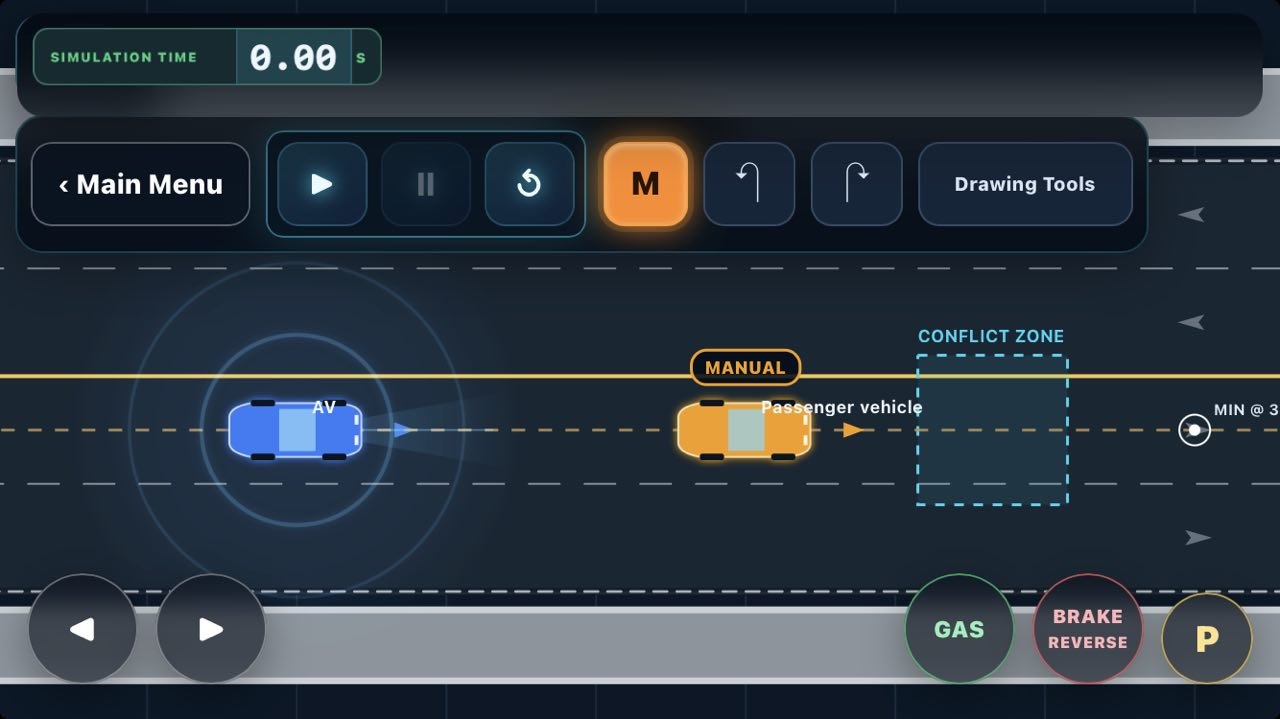
    Use manual road-user control in supported demo builds to create less predictable, human-in-the-loop AV stress tests.

  5. 05

    Inspect the response

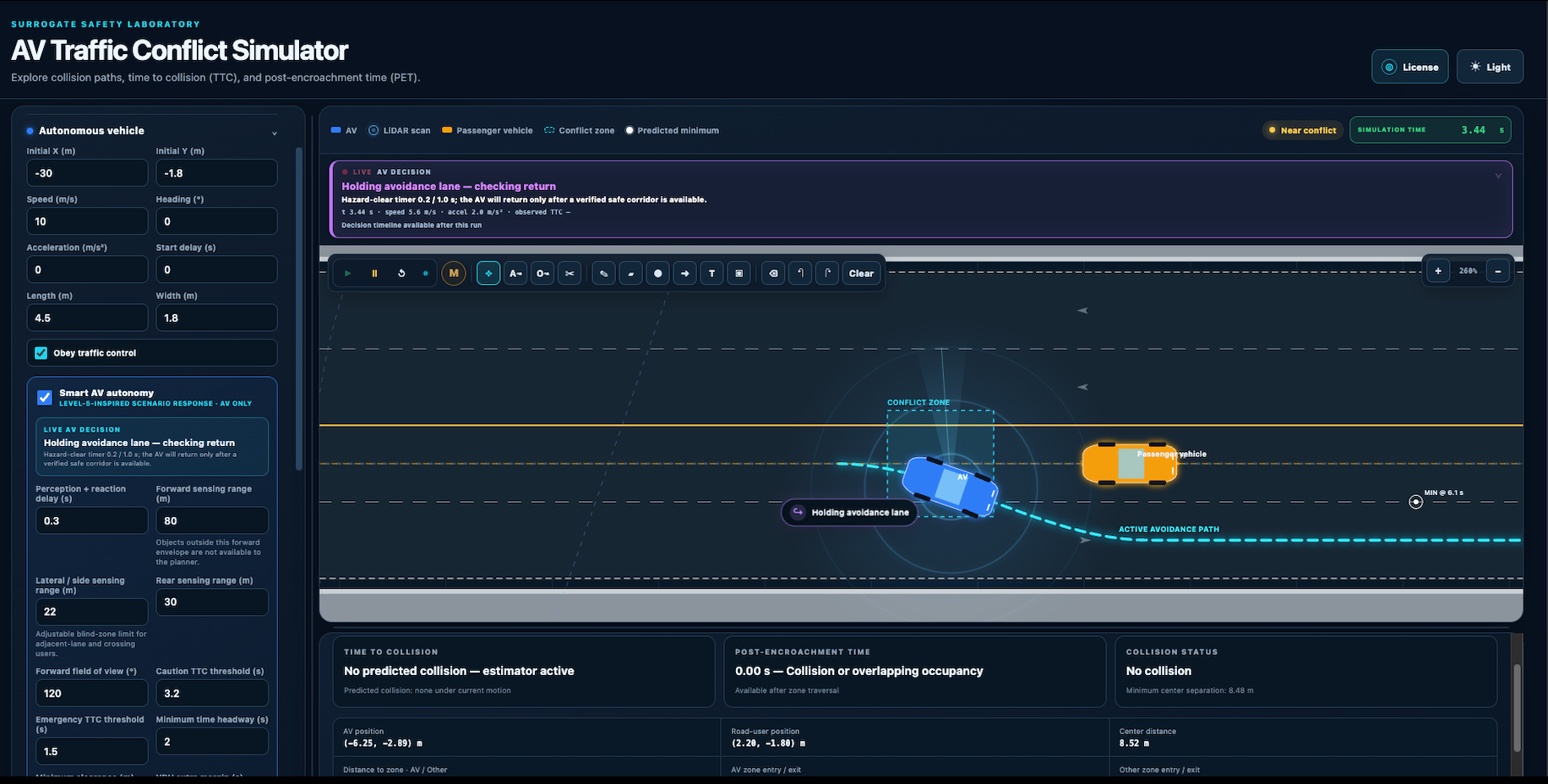
    Review conflict status, live AV decision states, avoidance-path visualization, and the effect of sensing or response settings.

03 / CORE CAPABILITIES

Public research infrastructure and an advanced demonstration layer.

The portfolio distinguishes what is currently distributed in the public repository from capabilities shown in the newer development and demonstration build.

Public open-core v0.1

Reproducible TTC/PET simulation

  • AV interactions with passenger vehicles, pedestrians, and bicycles
  • Configurable motion, dimensions, delays, and conflict-zone geometry
  • TTC, predicted collision timing, PET, and minimum-separation tracking
  • Collision, near-conflict, safe-passage, and no-shared-conflict examples
  • Responsive browser interface with playback and experiment controls
Newer demonstration build

Interactive AV stress testing

  • Manual road-user driving for human-in-the-loop stress testing
  • Live, inspectable AV behavioral states and decisions
  • Active avoidance-path visualization on the roadway
  • Configurable sensing, reaction, and conflict thresholds
  • Touch-oriented manual controls in supported iOS layouts

04 / EXTENDED VIDEO DEMO

Full product walkthrough.

The extended demonstration covers scenario controls, TTC/PET analysis, manual interaction, live AV decisions, and avoidance-path visualization.

Open the demonstration on YouTube

05 / RESPONSIVE INTERFACES

One experiment across desktop and touch layouts.

The desktop interface prioritizes scenario configuration and live analytical inspection. The supported iOS layout moves essential playback and manual-driving controls into touch-oriented positions.

Desktop AV Traffic Conflict Simulator showing a live avoidance path, scenario parameters, TTC and PET panels
Desktop web interfaceScenario inputs, AV decision status, active path, and safety measures in one workspace.
iOS home-screen web app layout with manual gas, brake, reverse, parking, and steering controls
iOS home-screen experienceTouch-oriented controls in a supported browser build; this is not presented as a native App Store application.

06 / TECHNICAL ARCHITECTURE

Browser-native, transparent, and extensible.

Simulation

Top-down motion and occupancy

Configurable road-user state, motion assumptions, footprints, conflict zones, playback controls, and example scenarios.

Safety analytics

TTC, PET, and separation

Predicted overlap timing, zone-entry and exit timing, minimum separation, and outcome classification are exposed directly in the interface.

AV experimentation

Human-in-the-loop behavior

Newer builds let a tester create sudden maneuvers and inspect how AV decision state, path choice, sensing, and response settings change.

Open-core delivery

Public foundation, separated modules

The MIT-licensed public core supports education and reproducible experiments while advanced modules can evolve separately.

07 / ROLE & TECHNICAL STACK

Designed and developed end to end.

The public core is a browser-native HTML, CSS, and JavaScript application with no external runtime dependency or build step.

JavaScriptHTMLCSSComputational geometryMotion simulationTTCPETResponsive interaction designHuman-in-the-loop testingGitHub ActionsMIT open core

08 / AVAILABILITY & SAFE USE

Explore the product and its public foundation.

This simulator is intended for research, education, prototyping, and demonstration. It is not a certified vehicle-safety system and should not replace field validation or safety-case evidence.